https://trash-in-trashcan.tistory.com/306
Supercent 과제하기 (2): 손님 만들기
https://trash-in-trashcan.tistory.com/305 Supercent 과제하기 (1): 플레이어 이동하기위 영상 그대로를 구현하는 과제를 받았다. 필요한 오브젝트나 효과등은 모두 제공해 주셨다.일단 영상을 보면 구현해야
trash-in-trashcan.tistory.com
이전 글에서 이어진다.
이제 손님이 테이블을 이용하는 로직을 추가한다. 그 전에 플레이어는 모은 돈을 사용하여 테이블을 언락 해야 한다. 또한, 손님이 테이블을 사용하기 위한 줄을 서는 로직도 추가해야 한다.
우선 언락 기능부터 만들어보자.

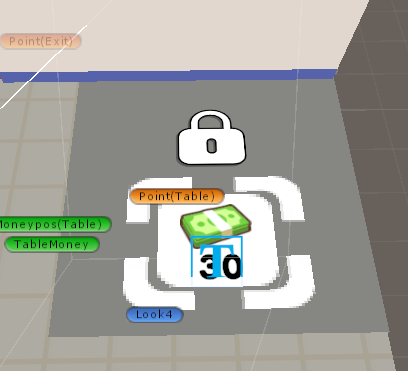

잠금 된 상태와 해제된 상태를 만들어두었다. 이제 tableManager를 생성하 Moneymanager를 수정해보자.
코드 보기
tableManager.cs
using System.Collections;
using System.Collections.Generic;
using UnityEngine;

public class TableManager : MonoBehaviour
{
   public static TableManager instance;

   [Header("Table Settings")]
   public bool isUnlocked = false;
   public bool isTableOccupied = false;
   public Customer currentCustomer = null;
   [SerializeField] private Transform breadPosition;
   private float breadHeight = 0.4f;

   [Header("Used Table")]
   private bool isDirty = false;
   [SerializeField] private GameObject trash;
   [SerializeField] private GameObject chair;
   [SerializeField] private ParticleSystem cleanningEffect;

   [Header("Table Queue")]
   private List<Customer> tableQueue = new List<Customer>();
   [SerializeField] private Transform tableQueueStartPoint;
   private float tableQueueSpacing = 1.5f;

   private void Awake()
   {
      if (instance == null)
      {
         instance = this;
      }
      else
      {
         Destroy(gameObject);
      }
   }

   public void UnLockTable()
   {
      isUnlocked = true;
      Customer firstCustomer = GetFirstCustomerInQueue();
      RequestTable(firstCustomer);
      if (ArrowManager.Instance.curStep == 4)
      {
         ArrowManager.Instance.NextStep();
      }
      CameraManager.instance.SwitchCameras(1);

   }

   public void JoinCheckoutQueue(Customer customer)
   {
      if (!tableQueue.Contains(customer))
      {
         tableQueue.Add(customer);
         UpdateQueuePositions();
         RequestTable(customer);
      }
   }

   public void LeaveCheckoutQueue(Customer customer)
   {
      if (tableQueue.Contains(customer))
      {
         tableQueue.Remove(customer);
         UpdateQueuePositions();
      }
   }

   private void UpdateQueuePositions()
   {
      if (tableQueueStartPoint == null)
      {
         return;
      }

      for (int i = 0; i < tableQueue.Count; i++)
      {
         Customer customer = tableQueue[i];
         if (customer != null)
         {
            // 줄서기 위치 계산
            Vector3 queuePosition = CalculateQueuePosition(i);

            customer.SetQueuePosition(queuePosition);
         }
      }
   }

   private Vector3 CalculateQueuePosition(int queueIndex)
   {
      // 시작점에서 queueDirection 방향으로 간격만큼 떨어진 위치 계산
      Vector3 position = tableQueueStartPoint.position + (Vector3.forward * tableQueueSpacing * queueIndex);
      return position;
   }

   private Customer GetFirstCustomerInQueue()
   {
      // null이나 유효하지 않은 고객들 제거
      tableQueue.RemoveAll(customer => customer == null || !customer.hasCollected || customer.isCheckingOut);

      return tableQueue.Count > 0 ? tableQueue[0] : null;
   }


   // 테이블 배정 가능하면 배정하고, 아니면 대기 큐에 추가
   public void RequestTable(Customer customer)
   {
      if (customer == null) return;


      // 테이블이 언락되어 있고 사용 중이 아니라면 즉시 배정
      if (isUnlocked && !isTableOccupied && !isDirty)
      {
         AssignTable(customer);
      }
      else
      {
         // 대기줄에 추가
         if (!tableQueue.Contains(customer))
         {
            tableQueue.Add(customer);
            UpdateQueuePositions();
         }
      }
   }

   //테이블 배정
   private void AssignTable(Customer customer)
   {
      if (currentCustomer  !=null || isDirty || !isUnlocked)
      {
         return;
      }

      isTableOccupied = true;
      currentCustomer = customer;

      customer.MoveToTable();
      LeaveCheckoutQueue(customer);

   }

   //테이블 반환
   public void ReleaseTable(Customer customer)
   {
      if (currentCustomer == customer)
      {
         isTableOccupied = false;
         currentCustomer = null;
         LeaveCheckoutQueue(customer);

         // 테이블에 놓인 빵들 삭제
         ClearTableBreads();

         UsedTable();
      }
   }

   //테이블 정리(반환시 호출됨)
   private void ClearTableBreads()
   {
      if (breadPosition == null) return;

      // breadPosition의 모든 자식(빵들) 삭제
      for (int i = breadPosition.childCount - 1; i >= 0; i--)
      {
         Transform child = breadPosition.GetChild(i);
         if (child != null)
         {
            Destroy(child.gameObject);
         }
      }

   }


   //테이블 사용할때 테이블 위에 빵 내려놓음
   public void putBread(List<GameObject> customerBreads)
   {
      if (breadPosition == null)
      {
         return;
      }

      if (customerBreads == null || customerBreads.Count == 0)
      {
         return;
      }


      // 고객의 빵들을 테이블 위치로 이동
      for (int i = 0; i < customerBreads.Count; i++)
      {
         GameObject bread = customerBreads[i];
         if (bread != null)
         {
            // 각 빵의 위치 계산 (수직으로 쌓기)
            Vector3 newPosition = breadPosition.position + Vector3.up * (i * breadHeight);

            // 빵 위치 이동
            bread.transform.position = newPosition;
            bread.transform.rotation = breadPosition.rotation;

            // 부모를 breadPosition으로 변경
            bread.transform.SetParent(breadPosition);

            // 물리 비활성화 (테이블 위에 안정적으로 놓기)
            Rigidbody breadRb = bread.GetComponent<Rigidbody>();
            if (breadRb != null)
            {
               breadRb.isKinematic = true;
               breadRb.useGravity = false;
            }

         }
      }
   }

   //사용한 테이블
   private void UsedTable()
   {
      isDirty = true;
      trash.SetActive(true);
      chair.transform.localEulerAngles = new Vector3(0, -150, 0);
      ArrowManager.Instance.NextStep();

   }

   //청소 -> 청소 하고나서 기다리고 있던 손님이 있으면 내줌
   public void Clean()
   {
      if (isDirty)
      {
         isDirty = false;

         SoundManager.instance.PlaySound("trash");
         cleanningEffect.Play();
         StartCoroutine(CleaningAnimation());
      }

      Customer firstCustomer = GetFirstCustomerInQueue();
      if (firstCustomer != null) RequestTable(firstCustomer);

      ArrowManager.Instance.End();

   }

   //청소
   private IEnumerator CleaningAnimation()
   {
      // 애니메이션 설정
      float duration = 1.0f; // 전체 애니메이션 시간
      float jumpHeight = 1.5f; // 쓰레기가 튀어오를 높이

      // 시작 위치와 회전 저장
      Vector3 trashStartPos = trash.transform.position;
      Vector3 chairStartRotation = new Vector3(0, -150, 0);
      Vector3 chairEndRotation = new Vector3(0, -180, 0);

      float elapsedTime = 0f;

      while (elapsedTime < duration)
      {
         elapsedTime += Time.deltaTime;
         float progress = elapsedTime / duration;

         // 쓰레기 튀어오르기 (포물선 궤도)
         float jumpProgress = Mathf.Sin(progress * Mathf.PI); // 0에서 1로 갔다가 다시 0으로
         Vector3 currentTrashPos = trashStartPos + Vector3.up * (jumpProgress * jumpHeight);
         trash.transform.position = currentTrashPos;

         // 의자 회전 (부드럽게 -150도에서 -180도로)
         float rotationY = Mathf.Lerp(-150f, -180f, progress);
         chair.transform.localEulerAngles = new Vector3(0, rotationY, 0);

         yield return null;
      }

      // 애니메이션 완료 후 정리
      trash.SetActive(false);
      chair.transform.localEulerAngles = chairEndRotation;
      trash.transform.position = trashStartPos;

   }

}
MoneyManager.cs
using System;
using System.Collections;
using System.Collections.Generic;
using TMPro;
using Unity.VisualScripting;
using UnityEngine;

[System.Serializable]
public class MoneyStack
{
    public string stackName; // 스택 이름 (디버깅용)
    public List<GameObject> moneyList = new List<GameObject>(); // 해당 스택의 돈 오브젝트들
    public int currentAmount = 0; // 현재 쌓인 돈 개수
    public Transform MoneyPos; // 수집 지점
}

public class MoneyManager : MonoBehaviour
{
    public static MoneyManager instance;

    [Header("Money Stacks")]
    [SerializeField] private List<MoneyStack> moneyStacks = new List<MoneyStack>(); // 여러 돈 스택들

    [Header("Money Settings")]
    public int playerMoneyAmount = 0;
    private float moneyDuration = 0.1f;
    private float moneyInterval = 0.02f;
    [SerializeField] private GameObject moneyPrefab;

    [SerializeField] private TextMeshProUGUI PlayerMoneyText;

    // 돈의 원래 위치 저장용 (모든 스택 통합)
    private Dictionary<GameObject, Vector3> originalPositions = new Dictionary<GameObject, Vector3>();

    [Header("Unlock")]
    [SerializeField] private List<TMPro.TextMeshProUGUI> moneyTextList = new List<TMPro.TextMeshProUGUI>();
    [SerializeField] private List<int> needMoney = new List<int>();
    [SerializeField] private List<GameObject> UnlockList = new List<GameObject>();
    private int currentStep = 0;

    private void Awake()
    {
        if (instance == null)
        {
            instance = this;
        }
        else
        {
            Destroy(gameObject);
        }
    }

    private void Start()
    {
        StoreOriginalPositions();
        moneyUpdate();
    }

    private void StoreOriginalPositions()
    {
        originalPositions.Clear();

        for (int stackIndex = 0; stackIndex < moneyStacks.Count; stackIndex++)
        {
            MoneyStack stack = moneyStacks[stackIndex];
            for (int i = 0; i < stack.moneyList.Count; i++)
            {
                if (stack.moneyList[i] != null)
                {
                    originalPositions[stack.moneyList[i]] = stack.moneyList[i].transform.position;
                }
            }
        }
    }

    public void AddMoneyToStack(int stackIndex, int amount)
    {
        if (stackIndex < 0 || stackIndex >= moneyStacks.Count)
        {
            return;
        }

        MoneyStack stack = moneyStacks[stackIndex];
        stack.currentAmount += amount;


        // 해당 스택 시각화
        VisualizeMoneyStack(stackIndex);
    }


    public void VisualizeMoneyStack(int stackIndex)
    {
        if (stackIndex < 0 || stackIndex >= moneyStacks.Count) return;

        MoneyStack stack = moneyStacks[stackIndex];

        int moneyToShow = Mathf.Min(stack.currentAmount, stack.moneyList.Count);

        for (int i = 0; i < moneyToShow; i++)
        {
            if (stack.moneyList[i] != null)
            {
                stack.moneyList[i].SetActive(true);
            }
        }

    }

    public void VisualizeMoney()
    {
        for (int i = 0; i < moneyStacks.Count; i++)
        {
            VisualizeMoneyStack(i);
        }
    }
    public void PlayerGetMoney(int panelIndex)
    {

        StartCoroutine(CollectMoneyFromStack(panelIndex));
    }

    private IEnumerator CollectMoneyFromStack(int stackIndex)
    {
        MoneyStack stack = moneyStacks[stackIndex];
        int moneyToCollect = stack.currentAmount;
        Transform curMoneyPoint = stack.MoneyPos;

        if (stack.currentAmount < 0)
        {
            yield return null;
        }

        if (ArrowManager.Instance.curStep == 3)
        {
            ArrowManager.Instance.NextStep();
        }

        // 플레이어 돈에 추가
        playerMoneyAmount += moneyToCollect;
        stack.currentAmount = 0;

        // 돈을 하나씩 순차적으로 이동
        for (int i = moneyToCollect - 1; i >= 0; i--)
        {
            if (i < stack.moneyList.Count && stack.moneyList[i].activeInHierarchy)
            {
                GameObject curMoney = stack.moneyList[i];
                StartCoroutine(MoneyEffect(curMoney,curMoneyPoint));

                yield return new WaitForSeconds(moneyInterval);
            }
        }

        moneyUpdate();
    }


    private IEnumerator MoneyEffect(GameObject money, Transform moneyPoint)
    {
        SoundManager.instance.PlaySound("Cost_Money");
        if (money == null || !money.activeInHierarchy)
            yield break;

        Vector3 startPos = money.transform.position;
        Vector3 endPos = moneyPoint.transform.position;

        float elapsedTime = 0f;

        while (elapsedTime < moneyDuration)
        {
            elapsedTime += Time.deltaTime;
            float progress = elapsedTime / moneyDuration;

            Vector3 currentPos = Vector3.Lerp(startPos, endPos, progress);

            float arcHeight = Mathf.Sin(progress * Mathf.PI) * 0.5f;
            currentPos.y += arcHeight;

            money.transform.position = currentPos;

            yield return null;
        }

        if (originalPositions.ContainsKey(money))
        {
            money.transform.position = originalPositions[money];
        }

        money.SetActive(false);
    }

    private void moneyUpdate()
    {
        PlayerMoneyText.text = playerMoneyAmount.ToString();
    }

    public void usingMoney(Transform playerTransform)
    {
        StartCoroutine(UsingMoneyAnimation(playerTransform));
    }

    private IEnumerator UsingMoneyAnimation(Transform playerTransform)
    {
        int curNeedMoney = needMoney[currentStep];

        // 실제 사용할 돈 계산: 필요한 돈과 소지금 중 작은 값
        int moneyToUse = Mathf.Min(curNeedMoney, playerMoneyAmount);

        // 사용할 돈만큼만 반복
        for (int i = 0; i < moneyToUse; i++)
        {
            // 1씩 감소
            curNeedMoney--;
            playerMoneyAmount--;

            // UI 업데이트
            moneyTextList[currentStep].SetText(curNeedMoney.ToString());
            moneyUpdate(); // 플레이어 돈 UI도 업데이트

            // 돈 점프 애니메이션 시작 (병렬 실행)
            StartCoroutine(MoneyJumpingAnimation(playerTransform));

            // 목표 달성 체크 (필요한 돈이 0이 되면)
            if (curNeedMoney <= 0)
            {
                needMoney[currentStep] = 0;
                Success();
                yield break; // 성공하면 코루틴 종료
            }

            // 다음 감소까지 잠시 대기
            yield return new WaitForSeconds(0.04f); // 애니메이션 간격
        }

        // 최종 상태 업데이트
        needMoney[currentStep] = curNeedMoney;
    }


    private IEnumerator MoneyJumpingAnimation(Transform playerTransform)
    {
        // 돈 오브젝트 생성
        if (moneyPrefab == null)
        {
            Debug.LogWarning("moneyPrefab이 설정되지 않았습니다!");
            yield break;
        }

        GameObject moneyObj = Instantiate(moneyPrefab);

        // 시작 위치 설정 (플레이어 위치 + 약간 위)
        Vector3 startPos = playerTransform.position + Vector3.up * 0.5f;
        moneyObj.transform.position = startPos;

        // 애니메이션 설정
        float duration = 0.8f; // 전체 애니메이션 시간
        float jumpHeight = 2.0f; // 돈이 튀어오를 높이

        float elapsedTime = 0f;

        while (elapsedTime < duration)
        {
            elapsedTime += Time.deltaTime;
            float progress = elapsedTime / duration;

            // 포물선 궤도 계산
            float jumpProgress = Mathf.Sin(progress * Mathf.PI); // 0→1→0

            // 위치 계산
            Vector3 currentPos = startPos + Vector3.up * progress;
            currentPos.y = startPos.y + (jumpProgress * jumpHeight);

            moneyObj.transform.position = currentPos;

            yield return null;
        }

        // 애니메이션 완료 후 오브젝트 삭제
        Destroy(moneyObj);
    }

    public void Success()
    {
        SoundManager.instance.PlaySound("Success");
        GameObject Lock = UnlockList[currentStep];
        GameObject UnLock = UnlockList[currentStep+1];

        Lock.SetActive(false);
        UnLock.SetActive(true);

        if (currentStep == 0)
        {
            TableManager.instance.UnLockTable();
        }

        currentStep++;
    }
}
그리고 이제 손님이 줄을 서는 로직을 Customer.cs에 추가해보자...
Customer Type이 0인 경우 테이블을 사용하지 않는 손님, 1인 경우 테이블을 사용하는 손님이다. Customer Type은 tableCustomerChance 확률에 영향을 받아 랜덤하게 정해진다.
CustomerType.cs 전체 코드
using System.Collections;
using System.Collections.Generic;
using UnityEngine;
using Random = UnityEngine.Random;

public class Customer : MonoBehaviour
{
    [Header("Customer Settings")]
    [SerializeField] public int requiredBreadCount = 0;
    [SerializeField] private int minBreadNeed = 1;
    [SerializeField] private int maxBreadNeed = 5;
    [SerializeField] public Animator anim;

    [Header("Customer Type")]
    [SerializeField] private int customerType = 0;
    [SerializeField] private float tableCustomerChance = 0.3f;

    [Header("Stacking Settings")]
    [SerializeField] public Transform customerStackPoint;
    [SerializeField] public float stackHeight = 0.4f;

    [Header("Movement Settings")]
    public Transform customerTransform;
    public List<Transform> wayPoints; // 0:입구, 1-7:빵공간들, 8:계산대, 9:출구, 10:테이블 대기줄, 11:테이블
    [SerializeField] public int curIndex = 0;
    [SerializeField] private float unitPerSecond = 2f; //속도(1초에 움직이는 거리)

    [Header("Bread Areas")]
    public List<Transform> breadAreas; // 7개의 빵 공간들 (wayPoints 1-7에 해당)
    [SerializeField] private int selectedBreadArea = -1; // 선택된 빵 공간

    [Header("Look at Settings")]
    public List<Transform> lookPoints;
    [SerializeField] private float rotationSpeed = 10f;

    [Header("Visual Feedback")]
    [SerializeField] public GameObject think;
    [SerializeField] public TMPro.TextMeshPro breadCountText;
    [SerializeField] private GameObject breadIcon;
    [SerializeField] private GameObject PosIcon;
    [SerializeField] private GameObject TableIcon;
    public GameObject HappyIcon;

    [Header("Queue Settings")]
    public int QueueIndex = 0;

    private bool leftArea = false;
    private bool ok12 = false;

    public List<GameObject> carriedBreads = new List<GameObject>();
    public int breadCnt = 0;

    private bool hasOrdered = false;
    public bool hasCollected = false;
    public bool isCheckingOut = false;
    private bool hasReceivedBag = false;

    // 이동 관련 상태
    public bool isMoving = false;
    private bool isWaitingAtDestination = false;

    private void Start()
    {
        if (customerTransform == null)
            customerTransform = transform;

        TypeSelect();
        Play();
    }

    public void Play()
    {
        StartCoroutine(Process());
    }

    private IEnumerator Process()
    {
        while (curIndex < wayPoints.Count)
        {
            // 현재 위치에서 다음 wayPoint까지 이동
            Vector3 startPos = customerTransform.position;
            Vector3 targetPos = wayPoints[curIndex].position;

            // 이동 시작
            isMoving = true;
            yield return StartCoroutine(MoveAToB(startPos, targetPos));
            isMoving = false;

            // 도착 후 회전
            yield return StartCoroutine(HandleArrivalWithRotation());

            // 목적지에서의 행동 처리
            yield return StartCoroutine(HandleDestinationAction());

            // 다음 목적지가 설정될 때까지 대기 (수동으로 curIndex가 변경됨)
            yield return new WaitUntil(() => !isWaitingAtDestination);
        }
    }

    private IEnumerator MoveAToB(Vector3 start, Vector3 end)
    {
        float percent = 0;

        // Y축을 시작점의 Y값으로 고정
        Vector3 fixedStart = new Vector3(start.x, start.y, start.z);
        Vector3 fixedEnd = new Vector3(end.x, start.y, end.z); // Y축은 start의 Y값 사용

        float moveTime = Vector3.Distance(fixedStart, fixedEnd) / unitPerSecond;

        while (percent < 1)
        {
            percent += Time.deltaTime / moveTime;
            customerTransform.position = Vector3.Lerp(fixedStart, fixedEnd, percent);

            // 이동 방향으로 회전 (Y축 제외)
            Vector3 direction = (fixedEnd - fixedStart).normalized;
            direction.y = 0; // Y축 회전 방향도 0으로 설정

            if (direction != Vector3.zero)
            {
                Quaternion targetRotation = Quaternion.LookRotation(direction);
                customerTransform.rotation = Quaternion.Slerp(
                    customerTransform.rotation,
                    targetRotation,
                    rotationSpeed * Time.deltaTime
                );
            }

            yield return null;
        }

        // 최종 위치도 Y축 고정
        customerTransform.position = fixedEnd;
    }


    private void TypeSelect()
    {
        float chance = Random.value;

        if (chance <= tableCustomerChance)
        {
            customerType = 1; // 테이블 고객
        }
        else
        {
            customerType = 0; // 일반 고객
        }
    }

    private void Update()
    {
        // 빵을 모두 수집했으면 다음 목적지로 이동
        if (hasCollected && breadCnt == requiredBreadCount && IsBreadArea(curIndex) && !isCheckingOut && isWaitingAtDestination)
        {
            if (leftArea)
            {
                curIndex = 12;
                Play();
            }

            else
            {
                if (customerType == 0)
                    MoveToCheckout();
                else if (customerType == 1)
                    MoveToTableQueue();

            }
        }

        if (curIndex == 12 && ok12 && isWaitingAtDestination)
        {
            if (customerType == 0)
                MoveToCheckout();
            else if (customerType == 1)
                MoveToTableQueue();
        }


        // 포장지를 받았으면 떠나기
        if (hasReceivedBag && customerType == 0)
        {
            MoveToExit();
        }

        // 애니메이션 (NavMeshAgent 대신 isMoving 상태 사용)
        anim.SetBool("Carrying", breadCnt > 0 || hasReceivedBag);
        anim.SetFloat("Moving", isMoving ? 1f : 0f);
    }

    private void SelectBreadAreaAndMove()
    {
        List<int> availableAreas = FindAvailableBreadAreas();

        if (availableAreas.Count > 0)
        {
            selectedBreadArea = availableAreas[Random.Range(0, availableAreas.Count)];
            if (selectedBreadArea == 5 || selectedBreadArea == 6 || selectedBreadArea == 7)
            {
                leftArea = true;
                curIndex = 12;
            }

            else
                curIndex = selectedBreadArea;

            GameManager.instance.AvailablePos[selectedBreadArea - 1] = false;

            isWaitingAtDestination = false; // 이동 재개
        }
    }

    private List<int> FindAvailableBreadAreas()
    {
        List<int> availableAreas = new List<int>();

        for (int i = 0; i < 7; i++)
        {
            if (GameManager.instance.AvailablePos[i])
            {
                availableAreas.Add(i+1);
            }
        }

        return availableAreas;
    }

    private IEnumerator HandleArrivalWithRotation()
    {
        int rotateIndex = -1;

        if (curIndex >= 1 && curIndex <= 7)
        {
            rotateIndex = 0;
        }
        else if (curIndex == 8)
        {
            rotateIndex = 1;
        }
        else if (curIndex == 10)
        {
            rotateIndex = 2;
        }
        else if (curIndex == 11)
        {
            rotateIndex = 3;
        }

        if(rotateIndex != -1 && rotateIndex < lookPoints.Count)
        {
            yield return StartCoroutine(RotateToTarget(lookPoints[rotateIndex]));
        }
    }

    private IEnumerator RotateToTarget(Transform target)
    {
        if (target == null) yield break;

        Vector3 targetDirection = target.position - transform.position;
        targetDirection.y = 0;

        if (targetDirection.magnitude < 0.1f)
        {
            yield break;
        }

        Quaternion targetRotation = Quaternion.LookRotation(targetDirection);

        while (Quaternion.Angle(transform.rotation, targetRotation) > 1f)
        {
            transform.rotation = Quaternion.Slerp(
                transform.rotation,
                targetRotation,
                rotationSpeed * Time.deltaTime
            );
            yield return null;
        }

        transform.rotation = targetRotation;
    }

    private IEnumerator HandleDestinationAction()
    {
        isWaitingAtDestination = true;

        if (curIndex == 0)
        {
            SelectBreadAreaAndMove();
        }
        else if (IsBreadArea(curIndex) && !hasOrdered)
        {
            hasOrdered = true;
            requiredBreadCount = Random.Range(minBreadNeed, maxBreadNeed + 1);
            UpdateVisualFeedback();
            GameManager.instance.AddCustomerToWaitingList(this);
            // 빵 공간에서는 빵을 모을 때까지 대기
        }
        else if (IsTableQueueArea(curIndex))
        {
            if (TableManager.instance != null)
            {
                TableManager.instance.RequestTable(this);
            }
        }
        else if (curIndex == 11) // 테이블
        {
            TableManager.instance.putBread(carriedBreads);
            breadCnt = 0;
            carriedBreads.Clear();
            yield return StartCoroutine(EnjoyAtTable());
        }
        else if (curIndex == 9) // 출구
        {
            yield return StartCoroutine(SafeDestroy());
        }
        else if (curIndex == 12)
        {
            if (breadCnt > 0)
            {
                ok12 = true;
                isWaitingAtDestination = true;
            }
            else if(breadCnt==0)
            {
                //basket으로 감
                curIndex = selectedBreadArea;
                yield return StartCoroutine(Process());
            }

        }

        yield return null;
    }

    // 큐 위치로 이동 (줄서기)
    public void SetQueuePosition(Vector3 targetPosition)
    {
        if (selectedBreadArea > 0 && selectedBreadArea <= 7)
        {
            GameManager.instance.AvailablePos[selectedBreadArea - 1] = true;
        }

        StartCoroutine(MoveToQueuePosition(targetPosition));
    }

    private IEnumerator MoveToQueuePosition(Vector3 targetPosition)
    {
        isMoving = true;
        yield return StartCoroutine(MoveAToB(customerTransform.position, targetPosition));
        yield return StartCoroutine(RotateToTarget(lookPoints[1])); // 적절한 방향으로 회전
        isMoving = false;
    }

    private void MoveToTableQueue()
    {
        GameManager.instance.AvailablePos[selectedBreadArea - 1] = true;

        // 상태 초기화 - 중요!
        ok12 = false;
        curIndex = -1; // 또는 다른 값으로 설정
        isWaitingAtDestination = false;

        // 모든 코루틴 정지
        StopAllCoroutines();

        TableManager.instance.JoinCheckoutQueue(this);
    }

    public void MoveToTable()
    {
        think.SetActive(false);
        curIndex = 11;
        isWaitingAtDestination = false;

        StopAllCoroutines();

        TableManager.instance.LeaveCheckoutQueue(this);

        StartCoroutine(Process());
    }

    private IEnumerator EnjoyAtTable()
    {
        float enjoyTime = Random.Range(3f, 5f);
        yield return new WaitForSeconds(enjoyTime);

        if (TableManager.instance != null)
        {
            TableManager.instance.ReleaseTable(this);
        }

        HappyIcon.SetActive(true);
        SoundManager.instance.PlaySound("cash");
        MoneyManager.instance.AddMoneyToStack(1, requiredBreadCount*5);
        MoveToExit();
    }

    private bool IsTableQueueArea(int index)
    {
        return index == 10;
    }

    private bool IsBreadArea(int index)
    {
        return index >= 1 && index <= 7;
    }

    private void MoveToCheckout()
    {

        GameManager.instance.AvailablePos[selectedBreadArea - 1] = true;

        ok12 = false;
        curIndex = -1;
        isWaitingAtDestination = false;

        // 모든 코루틴 정지
        StopAllCoroutines();

        GameManager.instance.JoinCheckoutQueue(this);
    }

    private void MoveToExit()
    {
        curIndex = 9;
        UpdateVisualFeedback();
        isWaitingAtDestination = false;
        Play();
    }

    private IEnumerator SafeDestroy()
    {
        GameManager.instance?.LeaveCheckoutQueue(this);

        if (TableManager.instance != null)
        {
            TableManager.instance.LeaveCheckoutQueue(this);
        }

        foreach (GameObject bread in carriedBreads)
        {
            if (bread != null)
            {
                Destroy(bread);
            }
        }
        carriedBreads.Clear();

        if (GameManager.instance != null)
        {
            GameManager.instance.CurCustomer--;
        }

        yield return new WaitForSeconds(2f);
        Destroy(gameObject);
    }

    public void StartCheckout()
    {
        isCheckingOut = true;
    }

    public void OnPaperBagReceived()
    {
        hasReceivedBag = true;
    }

    public void UpdateVisualFeedback()
    {
        int remain = requiredBreadCount - breadCnt;

        if (breadCountText != null)
        {
            if (remain > 0)
                breadCountText.text = remain.ToString();
            if (remain == 0)
            {
                breadCountText.text = "";
                breadIcon.SetActive(false);

                switch (customerType)
                {
                    case 0:
                        PosIcon.SetActive(true);
                        break;
                    case 1:
                        TableIcon.SetActive(true);
                        break;
                }
            }
        }

        if (think != null)
        {
            if (curIndex == 9) think.SetActive(false);
            else think.SetActive(true);
        }
    }
}
줄서는 로직MoveToTableQueue() 에는 GameManager의 JoinCheckoutQueue를 그대로 재사용했다.
2. 손님 생성기 CustomerSpawner.cs
손님 생성기를 사용하여 손님을 생성할것이다. 손님의 수는 maxCustomers로 관리할 수 있다.
CustomerSpawner.cs 전체 코드
using System.Collections.Generic;
using UnityEngine;

public class CustomerSpawner : MonoBehaviour
{
    [Header("Spawn Settings")]
    [SerializeField] private GameObject CustomerPrefab;
    [SerializeField] private Transform SpawnPoint;
    [SerializeField] private float spawnInterval = 5f; // 스폰 간격 (초)
    [SerializeField] private int maxCustomers = 10; // 최대 고객 수

    [Header("Customer Settings")]
    [SerializeField] private List<Transform> breadAreas;
    [SerializeField] private List<Transform> lookPoints;
    [SerializeField] List<Transform> points; // 0:입구, 1-7:빵공간들, 8:계산대, 9:출구

    [Header("Naming")]
    private int customerCounter = 0; // 고객 번호 카운터

    private float lastSpawnTime = 0f;

    private void Start()
    {
        SpawnCustomer(); // 시작할 때 즉시 한 명 스폰
        lastSpawnTime = Time.time;
    }

    private void Update()
    {
        if (ShouldSpawnCustomer())
        {
            SpawnCustomer();
        }
    }

    private bool ShouldSpawnCustomer()
    {
        // 조건: 시간이 지났고, 최대 고객 수에 도달하지 않았을 때
        bool timeToSpawn = Time.time >= lastSpawnTime + spawnInterval;
        bool belowMaxCustomers = GameManager.instance.CurCustomer < maxCustomers;

        return timeToSpawn && belowMaxCustomers;
    }

    private void SpawnCustomer()
    {
        if (CustomerPrefab != null && SpawnPoint != null)
        {
            GameObject customerObj = Instantiate(CustomerPrefab, SpawnPoint.position, SpawnPoint.rotation);
            Customer newCustomer = customerObj.GetComponent<Customer>();

            if (newCustomer != null)
            {
                // 고객 번호 증가 및 이름 설정
                customerCounter++;
                customerObj.name = customerCounter.ToString();

                // 컴포넌트 설정
                newCustomer.lookPoints = lookPoints;
                newCustomer.wayPoints = points;
                newCustomer.breadAreas = breadAreas;

                GameManager.instance.CurCustomer++;

                // 마지막 스폰 시간 업데이트
                lastSpawnTime = Time.time;

            }
            else
            {
                Destroy(customerObj);
            }
        }

    }

}
3. SoundManager
소리를 재생하는 soundManager. 마찬가지로 싱글톤으로 관리한다.
SoundManager.cs 코드
using System;
using UnityEngine;

public class SoundManager : MonoBehaviour
{
    public static SoundManager instance;

    [SerializeField] private AudioSource[] audioSources; // 3개의 AudioSource
    [SerializeField] private AudioClip[] audioClips;

    private void Awake()
    {
        if (instance == null)
        {
            instance = this;
        }
        else
        {
            Destroy(gameObject);
        }
    }

    public void PlaySound(String soundName)
    {
        AudioClip clipToPlay = GetAudioClipByName(soundName);

        if (clipToPlay != null)
        {
            PlaySoundOnAvailableSource(clipToPlay);
        }
    }

    private AudioClip GetAudioClipByName(string soundName)
    {
        switch (soundName)
        {
            case "cash":
                return audioClips[0];
            case "Cost_Money":
                return audioClips[1];
            case "Get_Object":
                return audioClips[2];
            case "Put_Object":
                return audioClips[3];
            case "Success":
                return audioClips[4];
            case "trash":
                return audioClips[5];
            default:
                return null;
        }
    }

    private void PlaySoundOnAvailableSource(AudioClip clip)
    {
        // 첫 번째로 재생 중이지 않은 AudioSource 찾기
        for (int i = 0; i < audioSources.Length; i++)
        {
            if (!audioSources[i].isPlaying)
            {
                audioSources[i].PlayOneShot(clip);
                return;
            }
        }


        audioSources[0].PlayOneShot(clip);
    }
}
4. UI 카메라를 바라보게 하기
플레이어 위의 MAX 텍스트나, 손님 머리위의 말풍선이 플레이어가 움직이더라도 계속 카메라를 정면으로 바라보도록 하기 위해서 다음 스크립트를 작성하고 해당 오브젝트에 추가한다.
using System.Collections;
using System.Collections.Generic;
using UnityEngine;

public class LookCamera : MonoBehaviour
{
    private void LateUpdate()
    {
        transform.LookAt(Camera.main.transform);
    }
}
5. 플레이어 안내 화살표 만들기
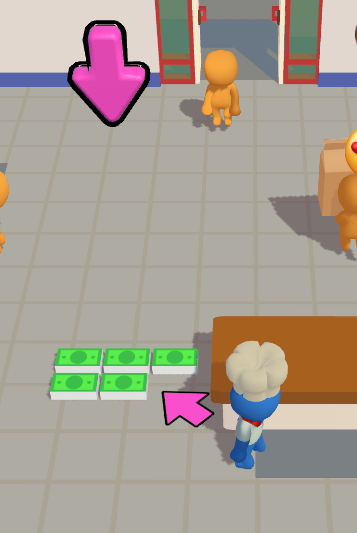
플레이어의 다음 행동을 안내하는 화살표를 만든다. 우선 플레이어의 발 밑의 화살표를 만들기 위해, 플레이어의 자식으로 DirectionDirector를 두고, 그 안에 Arrow를 넣는다.
이 상태에서 DirectionDirector의 Rotation Y축을 움직여보면, 화살표가 플레이어의 몸을 중심으로 회전하는 모습을 볼 수 있다.

이것을 활용하여 화살표로 플레이어의 다음 위치를 안내하도록 할 수 있다.
https://youtu.be/WsPkNGEdYxs?si=5GMKcc22M9fgVEYn
이 부분은 위 영상을 참고하여 만들었다. 또한 큰 화살표를 관리하는 스크립트도 작성했다. 이 두 화살표를 관리할 스크립트는 ArrowManager.cs로 두었다.
ArrowManager.cs
using System.Collections.Generic;
using UnityEngine;

public class ArrowManager : MonoBehaviour
{
    public static ArrowManager Instance;
    [SerializeField] private List<Transform> Target = new List<Transform>();
    [SerializeField] private DirectionIndicator DirectionIndicator;
    [SerializeField] private GameObject Arrow;

    public int curStep=0;

    private void Awake()
    {
        if(Instance == null)
            Instance = this;
        else
            Destroy(gameObject);

    }

    private void Start()
    {
        curStep = 0;
        SetTarget();
    }

    private void SetTarget()
    {
        Transform curDirection = Target[curStep];

        if(curStep ==5 ) DirectionIndicator.Hide();
        else if (curStep ==6) DirectionIndicator.Show();
        else DirectionIndicator.target = curDirection;

        Vector3 targetPos = curDirection.position;
        targetPos.y = 5f;

        Arrow.transform.position = targetPos;
    }

    public void NextStep()
    {
        curStep++;
        if (curStep < Target.Count)
        {
            SetTarget();
        }
        else
        {
            End();
        }

    }

    public void End()
    {
        if (Arrow != null)
        {
            DirectionIndicator.Hide();
            Arrow.SetActive(false);
        }
    }
}
DirectionIndicator.cs
using UnityEngine;

public class DirectionIndicator : MonoBehaviour
{

    public Transform target;

    private void Update()
    {
        Vector3 targetPosition = target.position;
        targetPosition.y = transform.position.y;
        transform.LookAt(targetPosition);
    }

    public void Hide()
    {
        gameObject.SetActive(false);
    }

    public void Show()
    {
        gameObject.SetActive(true);
    }

}
6. 카메라 전환하기
이 게임은 플레이어의 다음 행동을 유도하기 위해 화살표 외에도 카메라를 사용한다. 마침 나는 cinemachine을 사용하고 있으니, cinemachine을 사용하면 어렵지 않게 카메라를 전환할 수 있다.
Virtual Camera를 추가로 두 개 만든다.하나는 오른쪽 Lock 공간을, 다른쪽은 왼쪽 Lock공간을 가리킨다.

using System.Collections;
using System.Collections.Generic;
using Cinemachine;
using UnityEngine;

public class CameraManager : MonoBehaviour
{
    public static CameraManager instance;

    [Header("Virtual Cameras")]
    public CinemachineVirtualCamera MainCamera;
    public List<CinemachineVirtualCamera> VirtualCameras;

    [Header("Transition Settings")]
    public float blendTime = 2f;

    public float holdTime = 2f;

    private CinemachineBrain cinemachineBrain;

    private void Awake()
    {
        if(instance == null)
            instance = this;
        else
            Destroy(gameObject);

    }

    private void Start()
    {
        // Cinemachine Brain 찾기
        cinemachineBrain = Camera.main.GetComponent<CinemachineBrain>();

        if (cinemachineBrain != null)
        {
            // 블렌드 시간 설정
            cinemachineBrain.m_DefaultBlend.m_Time = blendTime;
            cinemachineBrain.m_DefaultBlend.m_Style = CinemachineBlendDefinition.Style.EaseInOut;
        }

        MainCamera.Priority = 20;

    }

    public void SwitchCameras(int CameraNumber)
    {
        StartCoroutine(CameraSwitchSequence(CameraNumber));
    }

    private IEnumerator CameraSwitchSequence(int CameraNumber)
    {
        VirtualCameras[CameraNumber].Priority = 20;
        MainCamera.Priority = 0;

        yield return new WaitForSeconds(blendTime);

        yield return new WaitForSeconds(holdTime);

        MainCamera.Priority = 20;
        VirtualCameras[CameraNumber].Priority = 0;

        yield return new WaitForSeconds(blendTime);

    }
}
실제 플레이 영상이다. 사실 만들다가 중간에 열정을 잃어서... 그래서 퀄리티가 영 처참하다.
이것으로 구현은 전부다. 재밌긴 한데 코드가 너무 더러워서 중간에 계속해서 확장하며 코드를 작성하기가 너무 어려웠다. 한단계씩 생각하면서 구현할 걸 그랬다.
https://github.com/pqud/supercent
GitHub - pqud/supercent: supercent 과제
supercent 과제 . Contribute to pqud/supercent development by creating an account on GitHub.
github.com
깃허브 링크
'Unity' 카테고리의 다른 글
| fixedDeltaTime과 deltaTime, FixedUpdate와 Update (0) | 2025.10.13 |
|---|---|
| 유니티 이벤트 (0) | 2025.10.12 |
| Supercent 과제하기 (2): 손님 만들기 (3) | 2025.10.05 |
| Supercent 과제하기 (1): 플레이어 이동하기 (2) | 2025.10.05 |
| 7. PC 에서 VR 전환 (2) | 2025.02.24 |